Ethernet Debugger
7060-A

Overview
More than just a gigabit-capable network tap.
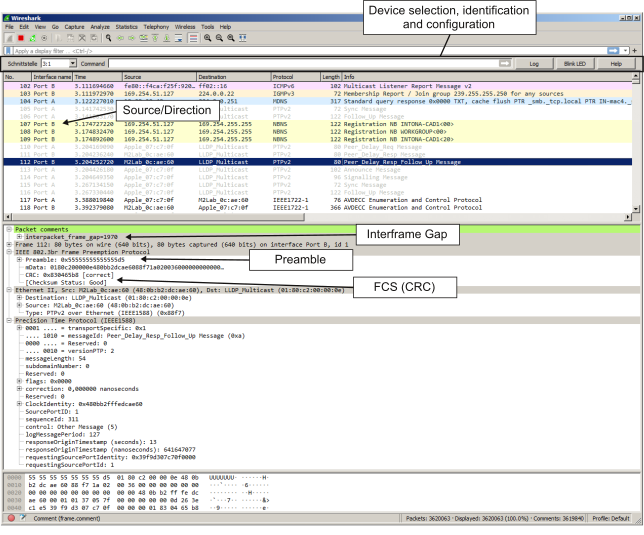
The Intona Ethernet Debugger is a device to capture all packets between two Gigabit Ethernet devices. It is able to detect data direction, inter-frame gaps, CRC errors and non-ethernet frames – while bypassing the undesirable path through the operating system's network stack. Moreover, it is able to inject or disrupt packets.
In summary, it's the ideal tool to inspect, debug, disrupt or just record everything on the ethernet wire. A perfect companion to Wireshark!
The host tool for Windows, Linux and macOS is available as open source software.
Features

- capture ethernet packets without intrusion (preamble, SFD, and FCS are all left intact)
- capture non-ethernet packets
- detect direction
- detect CRC validity
- count inter-frame gaps
- inject packets
- disrupt packets
- measure latency
- PoE passthrough
- accessed through userspace, no kernel device driver needed
- can be directly accessed from Wireshark
- can be accessed and controlled by command line interface
- open source host software
- compact and portable, USB-powered solution
The device is powered and accessed through USB 3.0. Installing the device will not destabilize your system. In particular, the device is not exposed as network device (and there is no kernel device driver). This has the advantage that your OS will not mess with it.
Applications

- Network tap
- Traffic capture
- Ethernet troubleshooting
- Protocol development (including layer-2 protocols like AVB / TSN, 1588, Spanning Tree)
- MAC development
- PHY debugging
- Cable testing
- Performance monitoring
- Intelligence wiretap
- Cyber security monitoring
- Capture and analyze security incidents
Downloads
| Datasheet | download |
| User Guide (Online) | link |
| User Guide (PDF) | download |
| Host tool source code | link to GitHub (recommended for Linux/BSD/macOS) |
| Host tool Windows installer | download (Windows 10/11 Intel x64; MD5: 07e5e6ff2b59e5a3b916fafb4e5bdb2f) |
| Letter of Volatility (Online) | link |
| Letter of Volatility (PDF) | download |
| Timing Review (Online) | link |
| Timing Review (PDF) | download |
| Firmware 1.11 (latest) | download (MD5: 10710257d98662af4da37b0775b35695) |
| Firmware 1.09 | download (MD5: 54aa2304fcb8f983a470cf88c1835279) |
For macOS and Linux, the host tool can be easily built from sources. The Ethernet Debugger is best used with Wireshark as inspection tool. The Windows version of the host tool contains the latest firmware update.